
Slab inventory software built around the actual material.
Organize slab photos, dimensions, QR codes and reservations. iBlocky connects stone warehouse inventory to digital catalogs and native WhatsApp and iMessage sharing on Elite.
14 days free on Elite. Card required.
By the iBlocky team at We Make Code · Updated
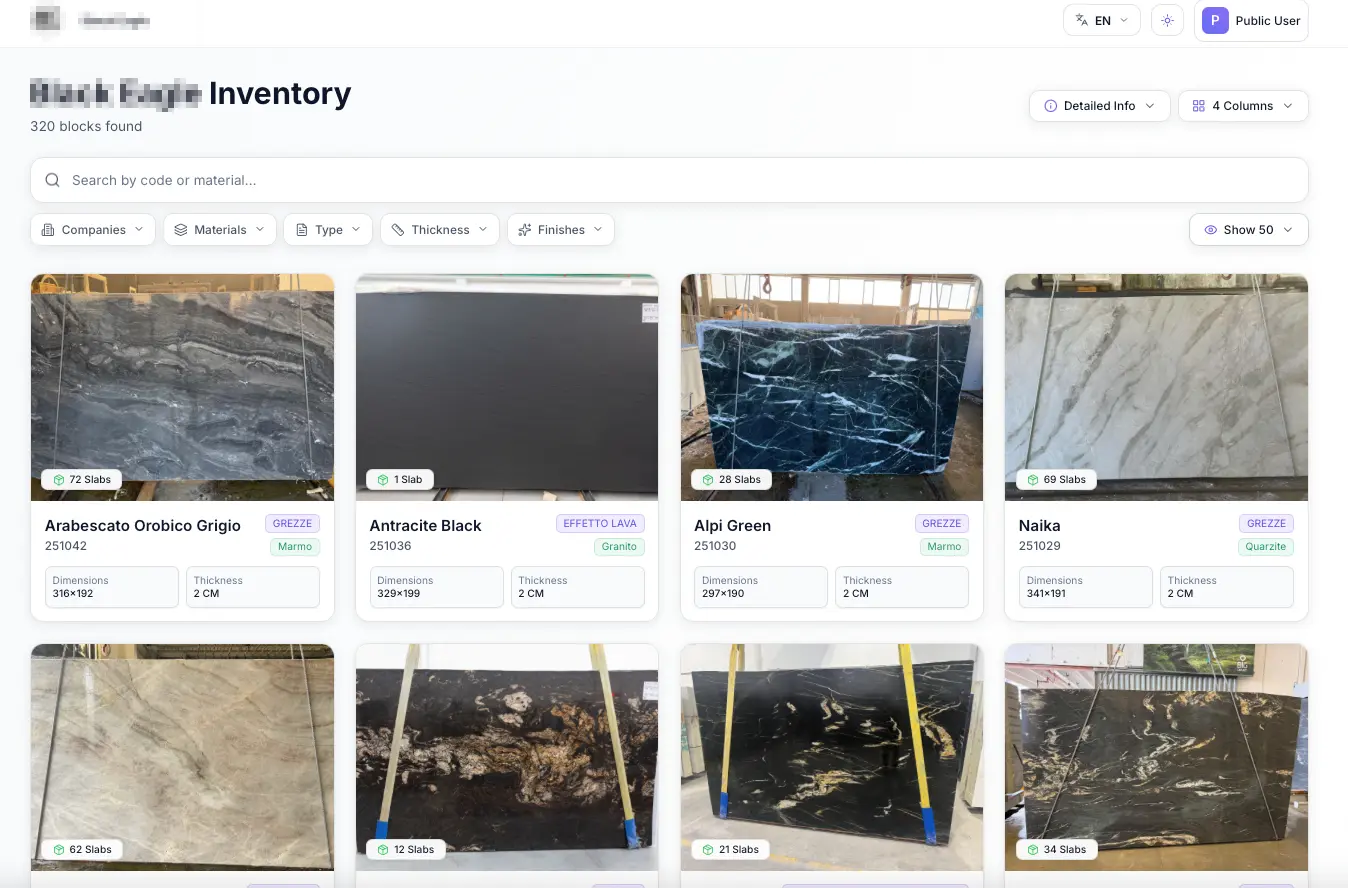
Slab inventory software connects each physical slab or bundle to a digital record containing its identity, photos, dimensions and availability. iBlocky brings that record into the sales workflow: your team can find materials, share them with buyers and track reservations without rebuilding the same information in separate files.
What belongs in a slab inventory record?
A stone photo is useful only when the buyer and the warehouse can identify the material behind it. Keep the material code, dimensions, thickness, finish and supporting media together. iBlocky supports photos, videos, mapscans and certificates alongside blocks, slabs and bundles.
Use a consistent naming process when new material arrives. For example, two bundles of the same quartzite may look similar but have different dimensions or movement. Separate records let the team discuss the specific material instead of relying on a product name alone.
- Record the material code and measured dimensions.
- Attach photos and supporting documents to the same record.
- Check the reservation or sales status before presenting stock.
Connect the warehouse rack to its digital record
QR codes provide a practical bridge between physical inventory and the information your team uses to sell it. A warehouse or showroom colleague can identify the record associated with the material instead of searching through unrelated photos and spreadsheets.
During a demo, bring an example of your existing labels and material codes. Review how you want to identify blocks, slabs and bundles, and which information should be available to the warehouse and sales team.
Keep reservations attached to the material
Inventory availability changes during a sales conversation. iBlocky tracks reservations and sales in the inventory workflow, so your team has a shared reference for the material it is discussing. Elite includes real-time synchronization; Pro uses daily synchronization.
Agree internally on who can reserve a material and how the team checks its status before offering it. Software supports this process, but a clear handoff between showroom, warehouse and sales is still important.
Turn slab inventory into something buyers can open
A digital material link gives the buyer the photos and details already attached to the inventory. They can open it in a browser without creating an account. On Elite, WhatsApp and iMessage are natively integrated into iBlocky and a branded public catalog is also included.
This is a useful fit for a distributor sending a selected group of slabs to a fabricator or an importer presenting available bundles to a dealer. The same inventory record supports the warehouse reference and the buyer conversation.
Questions about slab warehouses
Does iBlocky manage blocks as well as slabs?
Yes. iBlocky organizes natural stone blocks, slabs and bundles with their media and material details.
Can my warehouse team use it on a phone?
Yes. iBlocky is available on the web, iOS and Android. Pro and Elite include offline access for presenting downloaded material when a connection is unavailable.
Are WhatsApp and iMessage included in every plan?
Native WhatsApp and iMessage integration is included in Elite. Base and Pro have different capabilities; compare them after entering your contact and company details.
Review your workflow with us.
Create your profile, enter your company details, then compare plans in U.S. dollars. Only Elite includes a 14-day free trial, with card registration through Mollie. Base and Pro are billed immediately.
Start free trial